

Purchase a phone number
Who this is for: anyone who needs a new tracking number — buyers standing up a campaign, or publishers being issued numbers by a network. What you’ll need: the campaign the number will serve, and a target ZIP, city, or state if geography matters. Time: about 5 minutes. Where this lives: Buy Numbers
Moja sells tracking numbers directly from the platform. You can search local inventory by ZIP code or city and state, search toll-free, or take whatever is available when the digits do not matter.
Before you begin
Section titled “Before you begin”- Know which campaign the number will be assigned to
- Decide local or toll-free — see how numbers work if you are unsure
- If location matters, have the ZIP code, or the city and state, ready
- Check your plan and pricing before adding numbers to the account
Step 1 — Choose a search method
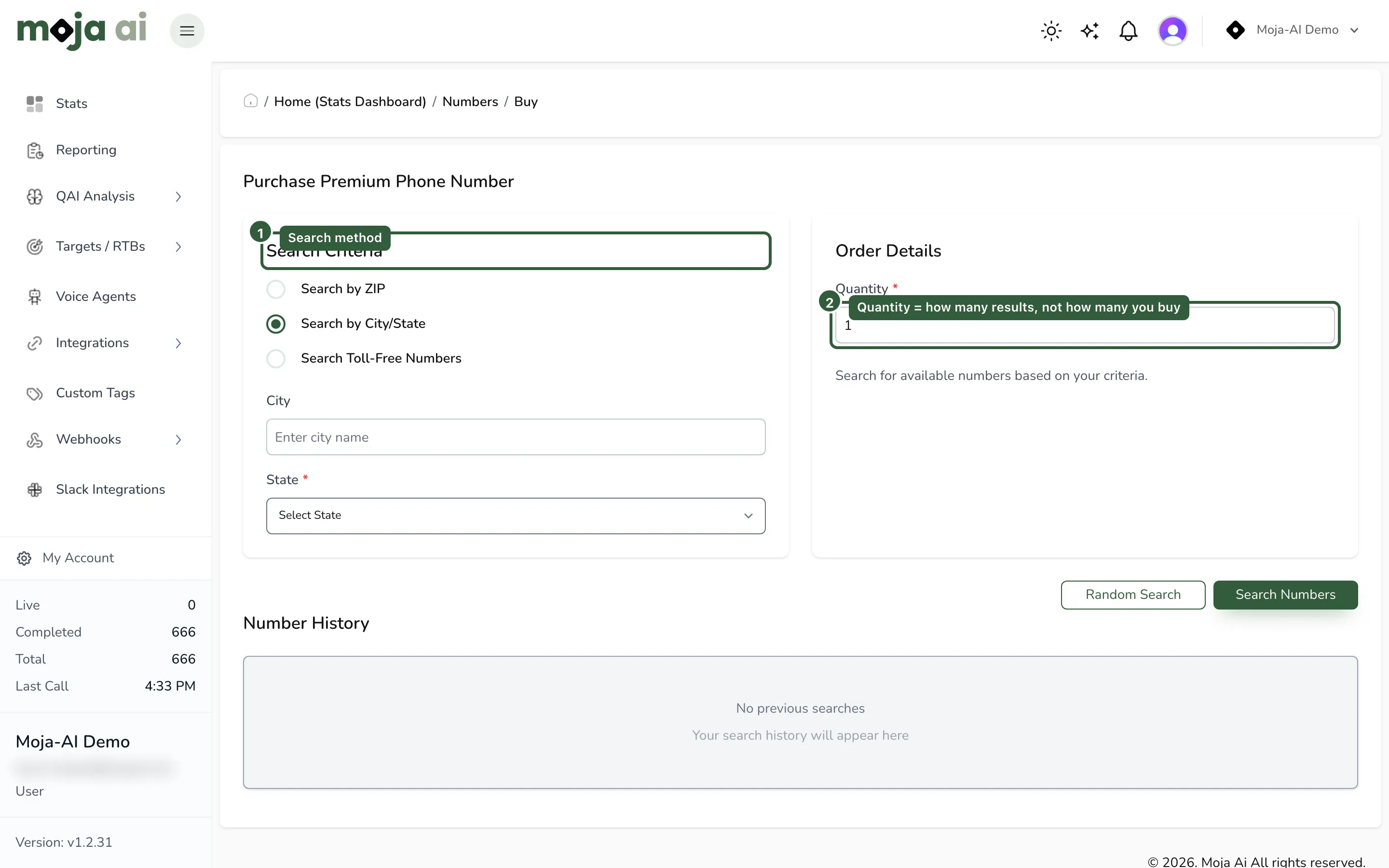
Section titled “Step 1 — Choose a search method”Open Buy Numbers and pick the search that matches what you need.
| Search | Use it when | What to enter |
|---|---|---|
| Search by ZIP | The number should be associated with a specific ZIP code | ZIP code, then quantity |
| Search by City/State | You want a local number inside a city and state | City name, state, then quantity |
| Search Toll-Free Numbers | You want a toll-free number rather than a local one | Quantity only |
| Random search | The digits and geography do not matter and you just need a working number | Nothing |
Step 2 — Search and select
Section titled “Step 2 — Search and select”-
Select the search method.
-
Enter the search criteria and the quantity of results you want to see.
-
Click Search Numbers.
-
Review the available numbers and choose the best fit.
Expected result: a list of available numbers. If a ZIP returns nothing, inventory in that ZIP is exhausted — try a neighbouring ZIP, a city and state search, or toll-free.
Step 3 — Purchase
Section titled “Step 3 — Purchase”-
Select the number you want.
-
Complete the purchase.
-
Refresh the page if the number does not appear immediately.
Expected result: the number appears in your account inventory and becomes selectable when attaching numbers to a campaign.
Step 4 — Attach it to a campaign and test
Section titled “Step 4 — Attach it to a campaign and test”A purchased number does nothing until it is attached. In the campaign’s Number Group section, add the number and set the publisher and publisher payout on it — full context in Create your first campaign, steps 9 and 10.
Then place a test call and confirm the call appears in your call logs with the expected campaign information.
Success looks like: a call log row on the new number, attributed to the right campaign and publisher.
Number History
Section titled “Number History”The Number History section stores your previous searches, so you can re-run a search without re-entering the criteria. Useful when you are buying numbers for the same metro repeatedly.
Pricing
Section titled “Pricing”Numbers are billed monthly. Pricing varies by number type and subscription plan, and usage charges may apply for call minutes and optional features such as call recording or AI services.
For current pricing, review your plan details or see mojaai.com/pricing.
Troubleshooting
Section titled “Troubleshooting”| Symptom | Likely cause | Fix |
|---|---|---|
| No numbers returned for a ZIP | Local inventory is exhausted for that ZIP | Try nearby ZIPs, a city/state search, or toll-free |
| The number you wanted disappeared | Inventory changed between search and purchase | Re-run the search and pick another |
| Purchased, but not visible in the account | Provisioning has not completed | Refresh once; if it is still missing, stop and check with support rather than buying a second number |
| Purchased, but calls are not routing | The number is not attached to a campaign, or the attachment is paused or inactive | Manage your number inventory |
| Unsure what a number will cost | Pricing varies by type and plan | Check plan details, or ask support before adding numbers |
Related
Section titled “Related”- Numbers overview
- Port a number to Moja — if you already have the number elsewhere
- Manage your number inventory
- Create your first campaign
- Understanding your billing invoices
Last reviewed: August 2026.