

Send call conversions to Google Ads
Who this is for: buyers running Google Ads traffic to a landing page with a phone number on it.
What you’ll need: admin access to the Google Ads account, the ability to edit the landing page <head>, and a Moja number pool for DNI.
Time: about 30 minutes, plus a wait for the first scheduled upload.
Where this lives: Integrations → Integrations (Beta) · Integrations → Snippets · Reporting / Call Tracking
Moja uploads eligible call conversions back to Google Ads so you can optimise on call outcomes instead of clicks. The whole integration rests on one requirement: Moja must have a Google click identifier attached to the call. Everything below exists to make that true.
How it works
Section titled “How it works”flowchart LR
A[Visitor clicks the ad<br/>lands with gclid] --> B[Moja snippet loads<br/>captures session + click ID]
B --> C[DNI swaps the number<br/>from the pool]
C --> D[Visitor calls the<br/>inserted number]
D --> E[Moja ties the call<br/>to the session]
E --> F{Eligible<br/>conversion?}
F -->|yes| G[Queued and uploaded<br/>on a schedule]
F -->|no| H[Call tracked in Moja,<br/>not uploaded]
-
The visitor clicks a Google ad. Google sends them to the landing page with a supported click identifier —
gclid,gbraid, orwbraid. -
The Moja snippet loads and captures the visitor session together with whichever click identifier is on the URL.
-
DNI replaces the phone number with a Moja tracking number from the configured pool.
-
The visitor calls. Because they dialled the inserted number, the call is associated with the snippet session and the captured click identifier.
-
Moja evaluates the conversion. If the call is eligible and a Google Ads conversion action is selected, the upload is queued.
-
Moja uploads to Google Ads on a schedule. Failed uploads are retried automatically, up to the configured retry limit.
Why the snippet and DNI are not optional
Section titled “Why the snippet and DNI are not optional”Without the snippet, Moja usually cannot see the website session or the click identifier — the call will appear in Moja but be ineligible for upload. Without DNI, the visitor dials a static number that carries no session, with the same result.
Static-number calls are still tracked in Moja, and existing call tracking is unaffected. They just cannot be uploaded as Google click conversions.
| Identifier | Where it comes from |
|---|---|
gclid |
Standard Google Ads auto-tagging |
gbraid |
iOS app-to-web click paths |
wbraid |
iOS web-to-web click paths |
If none of the three is present on the call, it cannot be uploaded as a Google click conversion. That is the first thing to check when a conversion is missing.
Before you begin
Section titled “Before you begin”- Google Ads auto-tagging is enabled, or supported click identifiers are otherwise preserved on your landing-page URLs
- A Google Ads conversion action exists for calls
- A Moja number pool is provisioned for the landing page
- You can edit the landing page
<head>— directly or through a tag manager
Step 1 — Connect the Google Ads integration
Section titled “Step 1 — Connect the Google Ads integration”-
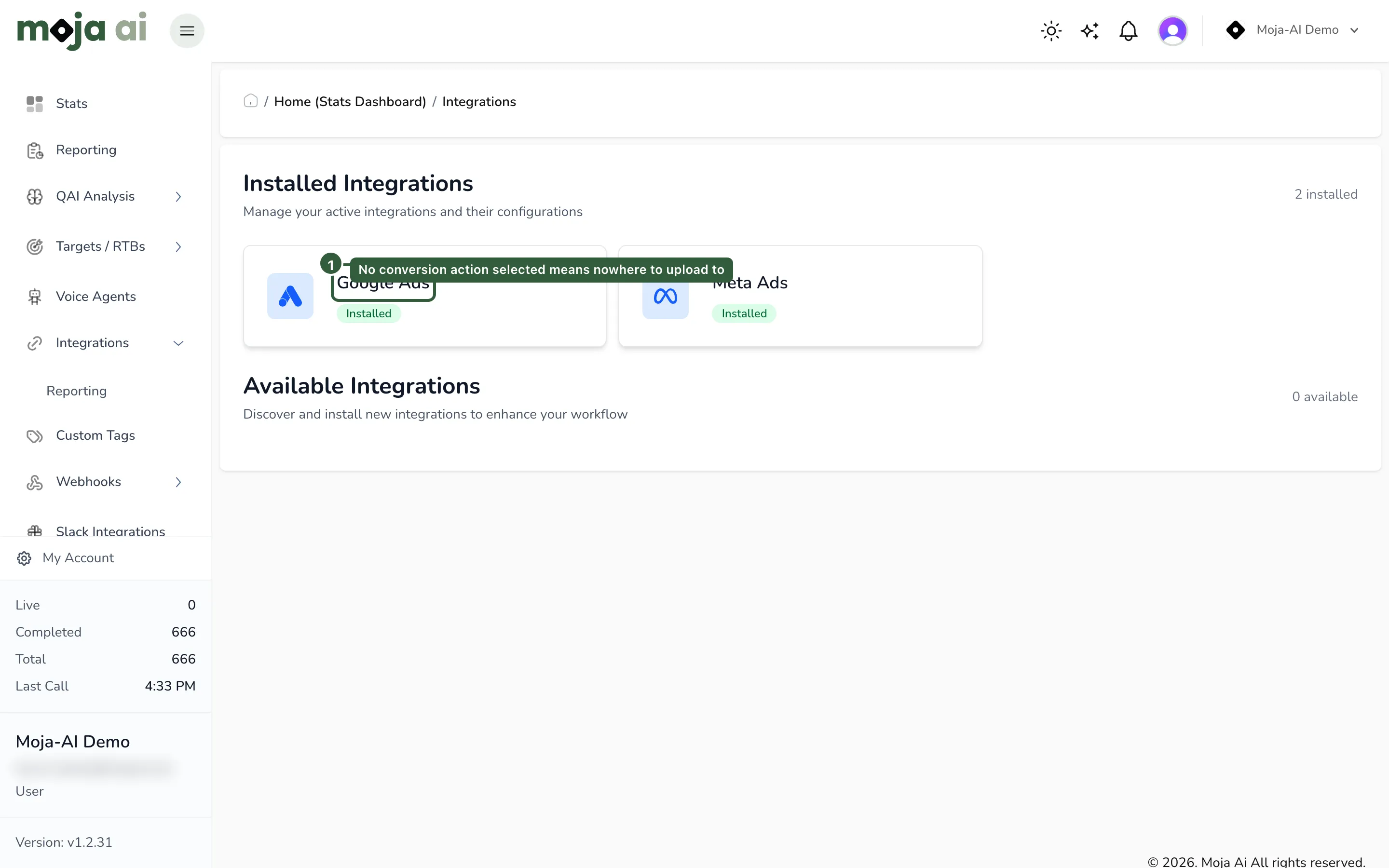
In Moja, open the sidebar and go to Integrations → Integrations (Beta).
-
Connect or confirm the Google Ads integration under Installed Integrations.
-
Select the Google Ads conversion action Moja should upload eligible calls to.
Expected result: Google Ads appears under Installed Integrations with a conversion action selected. No conversion action means nowhere to upload to, and eligible calls will queue against nothing.
Step 2 — Create the snippet
Section titled “Step 2 — Create the snippet”-
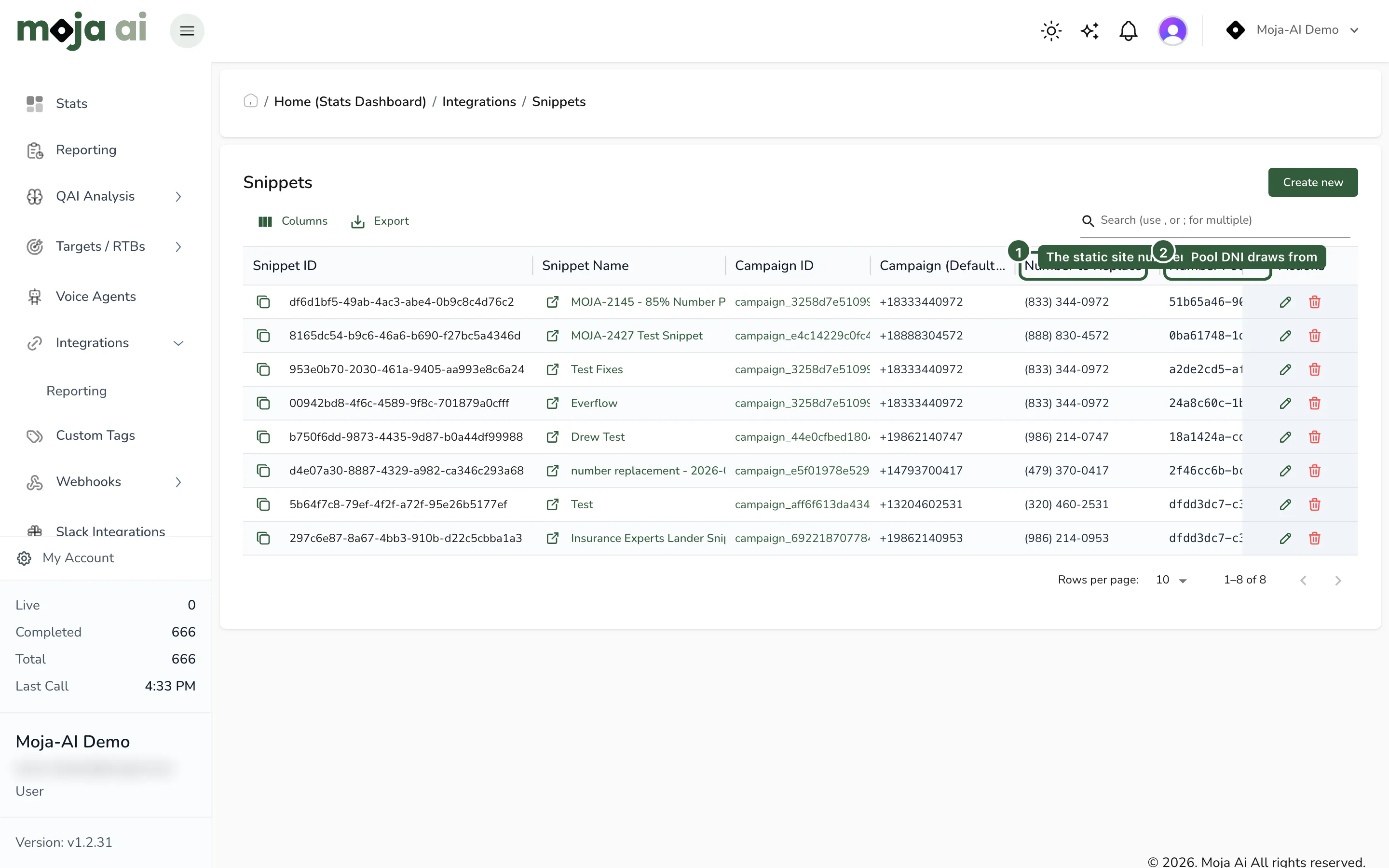
Go to Integrations → Snippets.
-
Create or edit a snippet for the landing page.
-
Configure the snippet fields:
- Snippet Name — the label you will recognise later
- Campaign (Default) Number — the number used when DNI cannot serve a pool number
- Number to Replace — the static website number that should be swapped out
- Number Pool — the pool of Moja tracking numbers DNI draws from
-
Confirm Enable Number Replacement is on.
-
If the site spans multiple domains, review Linked Domains so the visitor ID survives the hop between them.
Expected result: the snippet is listed with number replacement enabled and a pool assigned.
Step 3 — Install the snippet on the landing page
Section titled “Step 3 — Install the snippet on the landing page”Copy the snippet code from Edit Snippet and paste it into the <head> section of the landing page.
The snippet is generated per account, so copy it from your own portal rather than from any example. Full reference in DNI and DNI tracking tags, snippets, and number pools.
Expected result: loading the landing page with ?gclid=test123 on the URL shows a pool number in place of the static number.
Verify it works
Section titled “Verify it works”-
Open the landing page from a URL containing a supported click identifier.
-
Confirm the displayed phone number changed to a pool number.
-
Call that number and let the call complete normally.
-
Open Reporting / Call Tracking and find the call.
-
Confirm the call shows a captured tracking identifier.
Useful labels and columns in Reporting / Call Tracking:
| Label / column | What it tells you |
|---|---|
| WITH GCLID | Calls that arrived with a captured Google click ID |
| CONVERSIONS | Calls counted as conversions |
| UPLOADED | Conversions that have been uploaded back to the ad platform |
| Tracking IDs | The captured tracking identifiers on the call |
| Conversion Value | Type | Conversion value and conversion type on the call |
Success looks like: the test call appears WITH GCLID, is counted under CONVERSIONS if it met the conversion rule, and moves to UPLOADED after the next scheduled upload run.
Upload timing and retries
Section titled “Upload timing and retries”- Conversions are not uploaded instantly.
- Uploads are delayed to respect Google Ads requirements and any configured upload delay.
- Eligible conversions are processed automatically on a schedule.
- If Google Ads is temporarily unavailable or an upload fails, Moja retries automatically up to the configured retry limit.
Troubleshooting
Section titled “Troubleshooting”| Symptom | Likely cause | Fix |
|---|---|---|
| Calls appear in Moja but never upload | No gclid, gbraid, or wbraid was captured on the call |
Work through the row below |
| No Google click ID on any call | Auto-tagging is off; the landing page is stripping query parameters; the snippet is not installed; the snippet loads after the visitor calls; or the number was never replaced | Check each in that order — auto-tagging first, snippet placement last |
| Static-number calls are not uploading | Expected. Static-number calls usually carry no session and no click identifier | Route those visitors through DNI if the calls should be attributed |
| The wrong number is being replaced | The snippet’s replacement configuration is matching a number that should stay static | Review Number to Replace and confirm which numbers the snippet is allowed to touch |
| The number changes on one domain but not another | Cross-domain visitor ID is not being carried | Review Linked Domains on the snippet |
| Conversion uploaded, but the value is wrong | Conversion value or type is set differently in Moja and Google Ads | Compare the Conversion Value | Type column against the Google Ads conversion action |
Related
Section titled “Related”- DNI tracking tags, snippets, and number pools
- DNI developer reference
- Send call conversions to Meta Conversions API
- Track affiliate IDs with DNI on shared landing pages
- Call log column dictionary
Last reviewed: August 2026.