

Block unwanted callers
Who this is for: anyone paying for calls they do not want — repeat nuisance callers, a spam pattern from one country code, or a caller a specific buyer has asked never to receive again. Time: a minute for one number; a few minutes for a bulk import. Where this lives: Blocked Numbers
Blocked numbers and country codes can be managed at several scopes, so a block can be as narrow as one buyer or as broad as the whole network.
Choose the scope first
Section titled “Choose the scope first”| Scope | Blocks the caller from | Use when |
|---|---|---|
| Network Wide | Everything in the organisation | The caller should never reach you at all |
| Campaign | One campaign | The caller is a problem on one offer only |
| Publisher | Traffic from one publisher | You are isolating a source’s bad callers |
| Buyer | One buyer | The buyer has asked not to receive this caller |
| Target | One target | A specific destination should not receive them |
| RTB Formula / RTB Group | The relevant RTB path | The block belongs to a bidding path, not a campaign |
| Routing Plan | One routing plan | The block should follow the routing logic |
| Call Flow | One call flow | The block belongs to a flow used by several campaigns |
Pick the narrowest scope that solves the problem. A network-wide block on a number that is only a problem for one buyer costs you every other call that caller might have made.
Block one number
Section titled “Block one number”-
Go to Blocked Numbers.
-
Choose the scope tab you want to manage.
-
For any scope other than Network Wide, select the specific record — the campaign, publisher, buyer, target, RTB formula, routing plan, RTB group, or call flow.
-
Add the number, or the country code.
-
Choose whether the block is permanent or temporary.
Expected result: a call from that number into the blocked scope is stopped, and appears in reporting with the corresponding reason rather than as a routing failure.
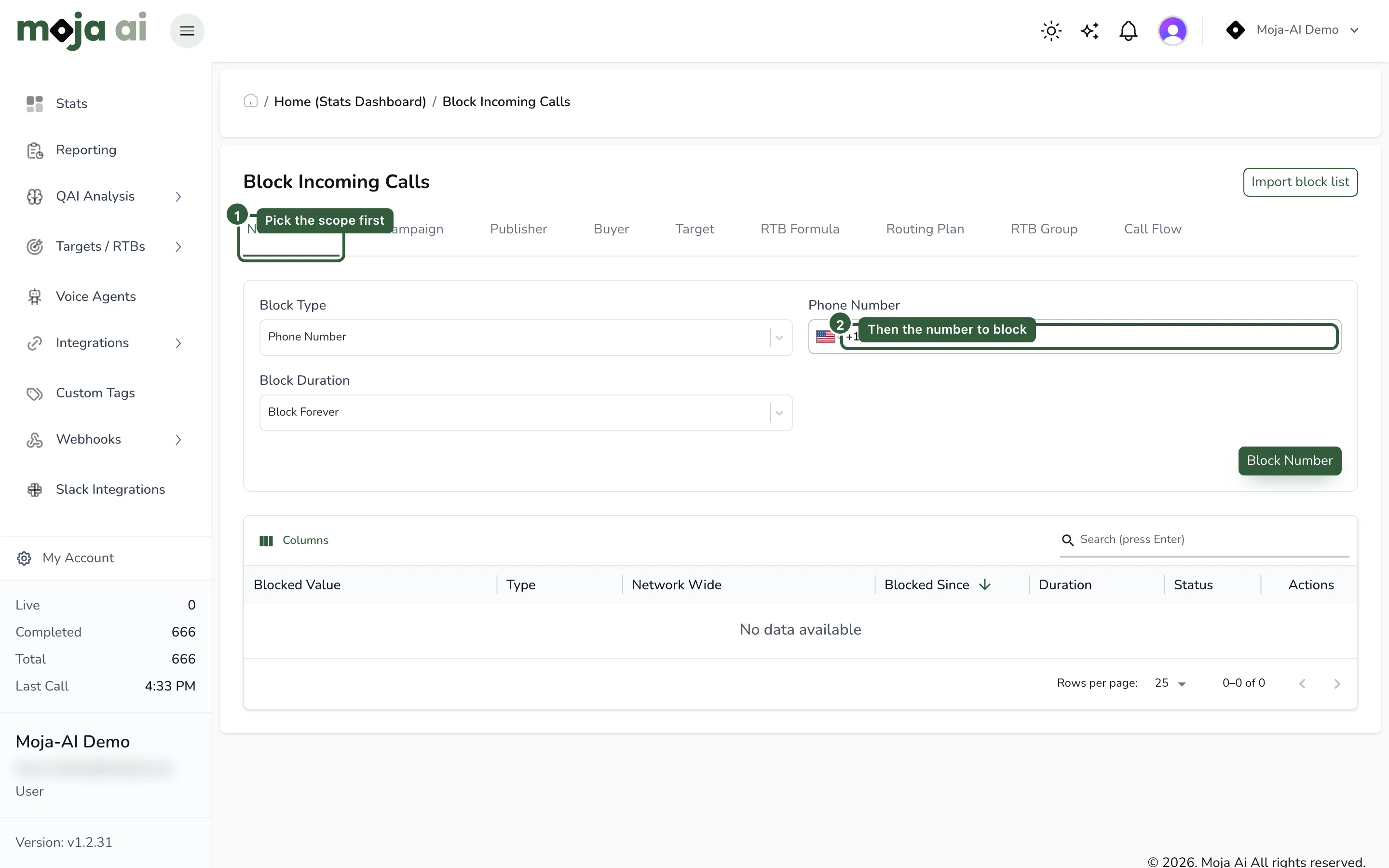
The page includes searchable scope-specific selectors, refresh controls, and quick links to open the selected related record — so you can confirm you are blocking against the right buyer without leaving the page.
Import a block list in bulk
Section titled “Import a block list in bulk”-
Go to Blocked Numbers → Block Incoming Calls.
-
Click Import block list.
-
Paste a list of numbers, or upload a
.txtor.csvfile. -
Preview the import. The preview shows valid numbers, duplicates, and invalid entries before anything is applied.
-
Confirm when the preview looks right.
Expected result: the preview count of valid entries matches what you intended to block. Anything listed as invalid was not applied — fix the formatting and re-import those rows.
Bulk import supports the expanded scopes, so a large list can be applied to a publisher or a buyer without adding entries one at a time.
Blocking a country code
Section titled “Blocking a country code”Country codes are managed alongside numbers on the same page and at the same scopes. Blocking a country code is a blunt instrument — it stops every caller from that country, including legitimate ones — so prefer it for patterns you are certain about.
Troubleshooting
Section titled “Troubleshooting”| Symptom | Likely cause | Fix |
|---|---|---|
| Blocked caller still gets through | The block was applied to a different scope than the one their call takes | Check which campaign, publisher, and target the call actually used in the call log, then block at that scope |
| Bulk import reports invalid entries | Mixed or non-E.164 formatting, or non-numeric rows | Reformat to E.164 and re-import only the rejected rows |
| Duplicates reported on import | The numbers are already blocked at that scope | No action needed; duplicates are not re-added |
| Legitimate callers stopped | A country-code block, or a network-wide block that should have been narrower | Remove and re-add at the narrowest scope that solves the problem |
| Blocked calls are not visible anywhere | You are looking at routing errors rather than the block reason | Blocked calls are recorded with their reason — see Call log column dictionary |
Related
Section titled “Related”- Numbers overview
- Manage your number inventory
- Spam labels and number reputation
- TCPA compliance: default and Blacklist Alliance
- Configuring sticky caller and duplicate call routing
Last reviewed: August 2026.