
Integrating Publishers & Sellers With Your Moja Inbound RTB Campaign
Introduction
Section titled “Introduction”💡 Overview
This guide explains how a Moja tracking customer can integrate with publishers and sellers of RTB phone calls that send inbound RTB bid requests into a Moja customer’s inbound-RTB-enabled campaign.
Each publisher receives one unique inbound RTB endpoint per campaign, supplied by the Moja customer.
🚀 1. Creating an Inbound RTB Endpoint
Section titled “🚀 1. Creating an Inbound RTB Endpoint”You must create a separate inbound RTB endpoint for each publisher inside the campaign.
ℹ️ Why one per publisher?
This ensures clean attribution, routing control, and flexible passthrough.
Open Campaigns → Create or Edit Campaign → Inbound RTB Publishers and configure the publisher’s endpoint.
Rate Limit: enter a whole number from 1 to 10 requests per minute. New publisher rows default to 10 requests per minute. Older values above 10, or settings using Hour or Day, remain visible and must be corrected before saving. For an older unit, select Use requests per minute, enter a valid rate, and resolve the validation warnings.
This campaign setting is separate from outbound buyer throttling. The October update changed the campaign form’s allowed settings; it did not introduce a new runtime enforcement policy.
For a shareable setup guide, open the integration hub. Its Welcome page contains the first-campaign checklist and walkthrough; select Publisher for the publisher RTB integration guide. The guide helps prepare and validate integration details—it does not submit RTB requests or route calls.
📸 Screenshot: Adding an inbound RTB endpoint
Section titled “📸 Screenshot: Adding an inbound RTB endpoint”
🔗 2. How Publishers Send Inbound RTB Requests
Section titled “🔗 2. How Publishers Send Inbound RTB Requests”Publishers commonly send inbound RTB bid requests using HTTP(S) GET requests with query-string parameters. GET is the recommended default because it is easiest to inspect, share, and troubleshoot. Moja can also accept POST requests, including JSON payloads, when a publisher integration requires it.
URL Format
Section titled “URL Format”https://rtb.moja.cloud/inbound_rtb/{inbound_rtb_id}?CALLER_ID=19995551234&tag=valueUse CALLER_ID as the standard caller ID parameter. CID is also supported. Use one of those consistently unless your Moja team confirms another alias for the campaign.
Formatting Rules
Section titled “Formatting Rules”✔️ Correct
• First parameter begins with ?
• Additional parameters begin with &
• Use tag=value formatting
❌ Incorrect
• Do not use brackets in inbound RTB requests
• Do not send malformed or unencoded parameters
Keep the endpoint path and query-parameter names free of whitespace. When configuring an outbound RTB formula, the request editor warns about whitespace in the URL path or parameter names, including encoded whitespace. This is not a blanket ban on spaces within parameter values; URL-encode values correctly.
Example Inbound RTB Request
Section titled “Example Inbound RTB Request”https://rtb.moja.cloud/inbound_rtb/{inbound_rtb_id}?CALLER_ID=19995551234&ZIP_CODE=90210&sub_id=source_1Copy the exact endpoint supplied for this publisher and campaign, including https://. Replace {inbound_rtb_id} with the assigned ID; do not send the braces. The sample caller ID and other values are literal examples, not template syntax.
Use CALLER_ID as the standard caller-ID parameter; CID is also supported. Send one consistently. E.164 is preferred; when sending a leading + in a query string, URL-encode it as %2B.
Your sending platform must expand its own variables before submitting the request. Do not send literal {{19995551234}} or unexpanded Moja macros such as [CALLER_ID].
🔍 3. Moja System Values
Section titled “🔍 3. Moja System Values”Moja automatically derives key system values:
| System Value | Description |
| CALLER_ID | Caller phone number |
| ZIP_CODE | Derived unless supplied inbound |
| CALLER_STATE | Derived unless supplied inbound |
Using System Values in Outbound RTB
Section titled “Using System Values in Outbound RTB”Outbound RTB uses bracket syntax:
[CALLER_ID] [ZIP_CODE] [CALLER_STATE]
⚠️ Important
In outbound RTB formulas, Moja expands variables such as [CALLER_ID], [ZIP_CODE], and [CALLER_STATE]. An inbound publisher request must contain the actual caller values—not those unexpanded macros.
📸 Screenshot: Outbound RTB system variables
Section titled “📸 Screenshot: Outbound RTB system variables”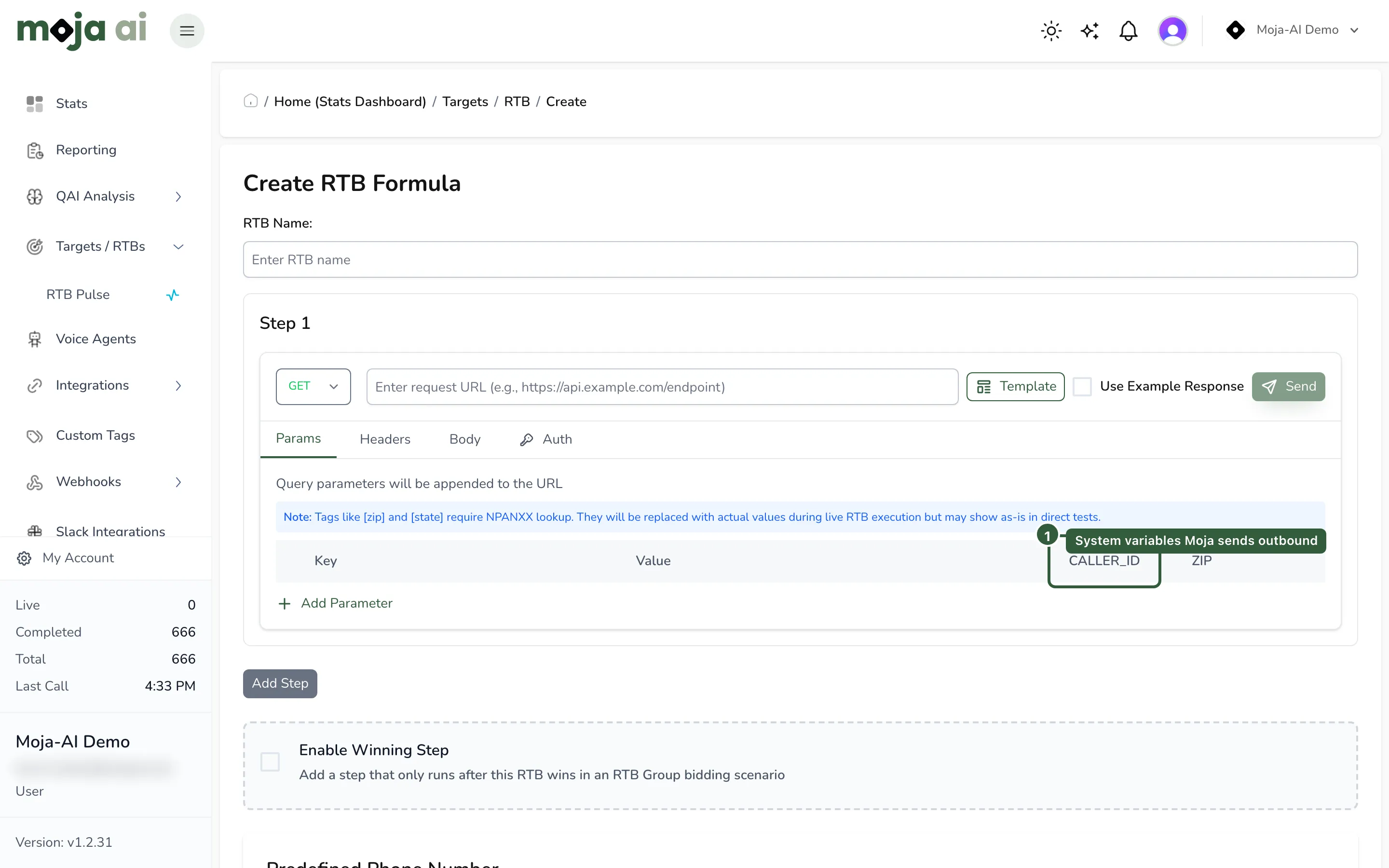
🧩 4. Sending Additional Metadata
Section titled “🧩 4. Sending Additional Metadata”Publishers can send additional metadata with their inbound RTB requests. Agree the parameter names in advance, and configure and test any values needed for Custom Tags, routing, reporting, or outbound buyer requests.
💡 Recommendation
Publishers should send any metadata they need passed to buyers for outbound RTB requests or used for supported buyer/target filtering.
Examples include:
-
Traffic source
-
Campaign identifiers
-
Channel / media tags
-
Custom tags
-
Lead/session IDs
-
Any buyer-required metadata
Filtering Support
Section titled “Filtering Support”Moja supports geographic and caller-ID filtering, as well as Advanced Filtering using configured Custom Tags.
To filter or route on publisher-supplied fields such as sub_id, lead_type, traffic_source, or vertical, define those fields as Custom Tags in Moja first. Then configure the relevant Target or RTB formula’s Advanced Filtering and test with a representative publisher request.
Sending an arbitrary parameter does not automatically create a routing rule or configure pass-through to buyers.
📸 Screenshot: Outbound RTB parameter configuration
Section titled “📸 Screenshot: Outbound RTB parameter configuration”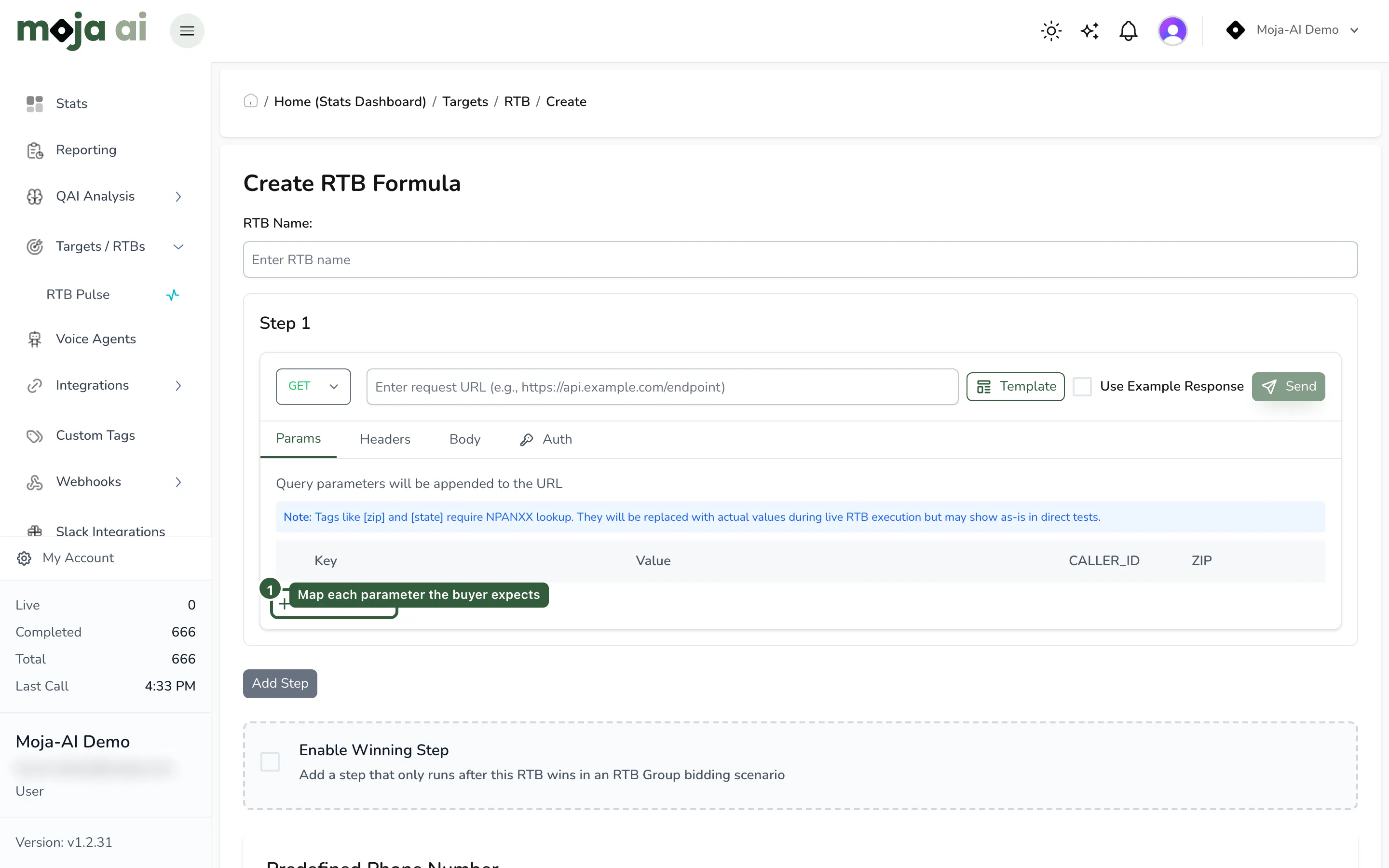
⭐ 5. Best Practices for Publishers
Section titled “⭐ 5. Best Practices for Publishers”Strongly Recommended
Section titled “Strongly Recommended”✔️ Send these for optimal routing
• CALLER_ID
• ZIP_CODE or State
Optional but Useful
Section titled “Optional but Useful”• Traffic source
• Lead/session ID
• Internal identifiers
• Buyer-required metadata
🔄 6. End-to-End Flow Summary
Section titled “🔄 6. End-to-End Flow Summary”🧭 How the full inbound → outbound RTB process works:
Step 1 — Customer Creates Inbound RTB Endpoint
Section titled “Step 1 — Customer Creates Inbound RTB Endpoint”A Moja customer creates one unique inbound endpoint per publisher.
Step 2 — Publisher Sends Inbound RTB Requests
Section titled “Step 2 — Publisher Sends Inbound RTB Requests”Publisher submits requests using GET with query-string parameters, or POST requests including JSON payloads when required by the publisher integration. Requests should include CALLER_ID or CID, ZIP/state when available, and other agreed metadata.
Step 3 — Moja Captures System + Custom Values
Section titled “Step 3 — Moja Captures System + Custom Values”Moja derives ZIP/state when needed and stores all inbound parameters.
Step 4 — Moja Builds Possible Routes for the Call
Section titled “Step 4 — Moja Builds Possible Routes for the Call”Routing may depend on caller ID, ZIP, state, routing plans, and campaign logic.
Step 5 — Outbound RTB (Optional)
Section titled “Step 5 — Outbound RTB (Optional)”Moja prepares an outbound RTB request using:
-
Static fields
-
Dynamic system fields
-
Passthrough values
Step 6 — Publisher Delivers the Call; Moja Routes It
Section titled “Step 6 — Publisher Delivers the Call; Moja Routes It”A bid request does not itself place or connect a call. After receiving a usable response with an eligible route and allocation, the publisher sends the same caller to the allocated receive number within the returned window. Moja then handles the call according to the campaign’s routing configuration.
HTTP 200 or success: true alone does not establish that a usable allocation exists. Inspect the returned routes and allocation result.
For request/response implementation details, see Send RTB requests to a Moja buyer and the Inbound RTB Buyer Guide.
Duration Add (sec)
Section titled “Duration Add (sec)”In dynamic payout mode, when matching the buyer’s duration, this setting adds seconds to the duration quoted to the publisher. For example, a buyer duration of 30 seconds plus a Duration Add of 2 seconds produces a publisher duration of 32 seconds.
If you explicitly configure a publisher Connected call length or Incoming call length condition, its configured duration is used instead. Check the returned terms during integration testing rather than assuming every payout condition uses the buyer-duration calculation.
Phone Number Allocation Time
Section titled “Phone Number Allocation Time”This sets the allocation window, from 1 to 60 seconds, for the publisher to deliver the caller after receiving a usable bid.
The returned window can be shorter when the downstream buyer’s bid expires sooner. The publisher must follow the allocation and expiry information in the response and send the same caller within that window.
Expiry ends the reservation for that opportunity; it does not mean the telephone number itself is deleted. Do not reuse an expired allocation for another caller.
🎉 Need Assistance?
Section titled “🎉 Need Assistance?”If you or your publishers need help sending inbound RTB requests, mapping fields, or configuring buyers, reach out to Moja Support — we’re here to help!